Sunday, June 29, 2014

FlipCon14 Reflections - The Sessions Day 1 (Tuesday)

You can also see the collaborative session notes from other attendees here.

Keynote - Living in Beta - Molly Schroeder
I know I'm not going to hit everything that I loved, but Molly's keynote was really inspiring and thought-provoking.  Here are a few things I jotted down on my iPad and a few tweets that I liked...

  • Digital learning doesn't always mean we are on our devices
  • There is a time/need for a lot of different spaces in learning. Learning includes some direction instruction, community share and individual work #flipcon14
    • There is a time for direct instruction.
    • A lot of the learning can happen in the community space and through discussion and collaboration. 
    • Then there is a time for "cave moments" when you just need to think and process by yourself.
  • “It’s not the technology; it’s HOW you USE the technology that can increase critical thinking and student learning.” #flipcon14
  • Digital Learning consists of three things - content, collaboration, create.
    • Learning is a circle of content, collaboration, and creating
    • CONTENT
      • So many ways to digitally deliver content to students asynchronously
    • COLLABORATE
      • Tools/Apps
        • Socrative
        • Lucid chart
        • Todaysmeet
        • Polleverywhere
        • Prezi
        • Quad blog
        • Google
        • Wonder book (global book club)
      • Learning spaces are not always set up for collaboration
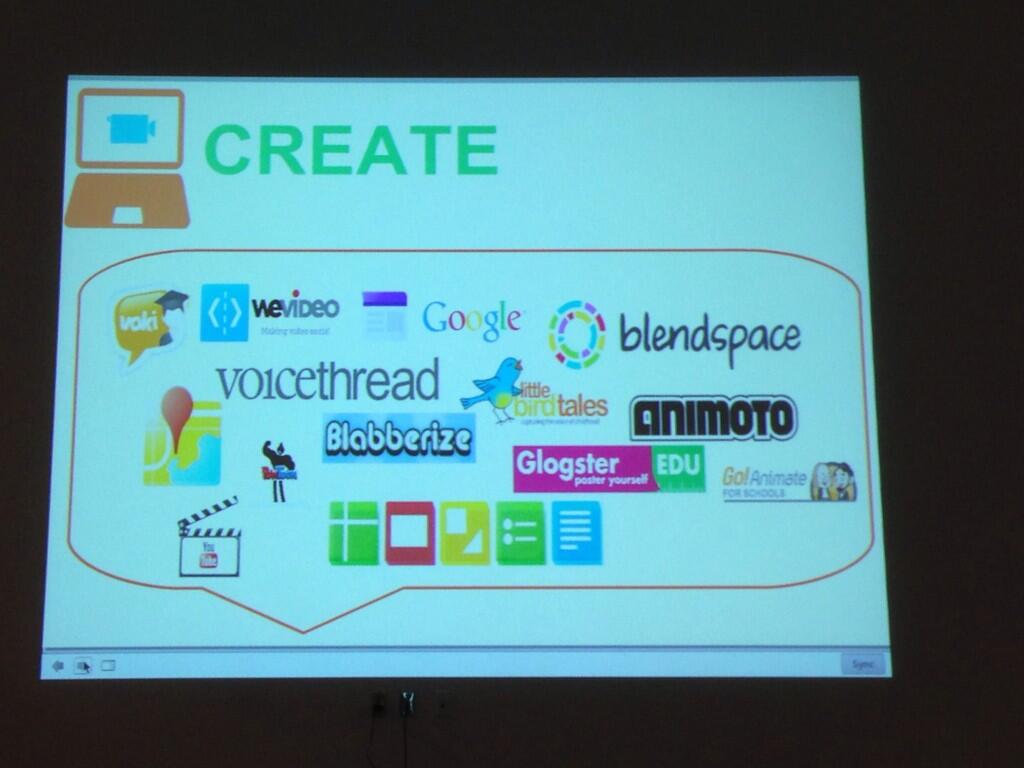
    • CREATE
  • We should be encouraging students to have a digital footprint
  • We need to create projects and activities that allow students to think, make (show me what you know, don't just tell me), improve
  • The final product is not the assessment, but the realization that you have learned more.
  • The future is not a multiple choice question... It's a design challenge
  • Dream it, Design it, Do it *most important part
  • I have a process... I commit to it, and then I figure out how to do that
  • Am I a future ready teacher?
      • Courageous leadership
      • Empowered teachers
      • Student agency
      • Inspiring spaces
      • Infrastructure (access to technology they need, does it work when it needs to work)
  • "Technology is like oxygen, it's just something there"
  • Stuck on an Escalator Video
  • Moonshot Thinking Video
  • Resources to check out
    • Google maps engine lite- import data from google form and it will plot it on the map
    • Check out newsela.com


Networking by Subjects
I was able to meet and chat with James Karr, a 7th grade online math teacher, and Shelly Depalmer, a math teacher who has wanted to start flipping for several years now, about getting started with #flipclass, how to make videos, organizing content, and lots of other stuff.  I also got Shelly signed up for Twitter (and made sure she got rid of her egghead profile picture and added a bio!), so go follow her!


Tuesday Lunch - Book Signing
If you weren't able to purchase the new book Flipped Learning: Gateway to Student Engagement, you can get it online! It looks like it's still "pre-order" online, so I'm not sure when it will officially be released.  All I can say is that I read it on the plane ride home and my first couple days back and finished it so inspired and absolutely honored to call these co-authors a part of my PLN. 


Make sure to follow these Flipped Educators on Twitter! 
Jon Bergmann  
Aaron Sams  
April Gudenrath  
Jason Hahnstadt  
Steve Kelly  
Brian Bennett  
Delia Bush 
Kristin Daniels
Tom Driscoll  
Carolyn Durley

Session A - Walking the Walk - Natalie Drake
  • @drakeIRT
  • Bit.ly/canflipwtw
  • Join flipped pd group on the Ning
  • Follow #flippedpd on twitter, chat twice a month
  • Ideas:
    • Create a YouTube video channel for teachers
    • Lots of links to research that you can give to admin to support it
    • MODEL FOR THEM
      • Have teachers act like a student and actually do a WSQ. Show them the information you get from it. Google form- what type of device they used, can select time and date of when they watched the video (even though time stamped, that is on submission and not when they finished video)
    • Give them a pre video that goes over some of the basic info that they need to know.  Then when you have the conference you can can have a conversation about what they thought and their questions.
    • Can also give feedback via a video screencast going over stuff
    • How to- schedule an outlook appointment on another calendar- link in her presentation

Session B - Peer Instruction
Troy Faulkner and Rob Warneke
  • Lots of second iterations of flipclass
    • Mastery, EFA, problem- or project- based
    • Troy's second iteration was peer instruction
  • Two parts of education
    • Transference of information
    • Assimilation of information
  • Tips for Peer Instruction
    • When they discuss their answer, you want them to be discussing with someone who DISAGREES, so you can have more in depth, higher order conversations
    • They don't always have students get up out of their chairs.
    • Give time limit for discussion


Panel Session (will watch on archive)

Learning Lounge - TouchCast
  • We wanted to spend a little time learning about some new apps and programs in the Learning Lounge so we skipped out on the panel and explored the hallway.
  • I had just learned about TouchCast last week... it is pretty cool!  Basically, you can have a video but then bring up all types of media while the video is playing and then students can continue to watch the video and explore the media all on the same screen.  It will make more sense if you just watch one or play around with it.
  • I was privileged to be interviewed for a "FlipCon14 TouchCast", which you can see here.  If you click "next" or "back", you can see a bunch more interviews from others at FlipCon14.


There are lots of other sessions from Monday I will be checking out in the archive and blogging about later!  Too much to do, too little time!

Wednesday, June 25, 2014

FLIPCON14 - WSQing your way to #flipclass success RESOURCES

Had a great time sharing with everyone in person and virtually for #FlipCon14.  Had a few technical snarfs (all my fault), but it was all ok.

For those of you interested in my resources, everything can be found HERE (or below), including my slides and basically anything else that you might have questions about.

Resources and Links
Crystal’s blog
FlipCon14 Google Presentation Slides
Sample Kahoot! (from presentation)
FAQ from my blog (all those acronyms explained!)
Flipped Learning Structure and Flow image (from presentation)
How I set up my classroom
What is a WSQ? (Description for students)
WSQ implementation ideas and resources from other teachers
WSQ chat ideas for classroom discussion
Crystal’s favorite WSQ chat ideas from this year (Pre-Cal)
Comments about the WSQ from 2013-2014 students (spreadsheet)
Detailed blog post on how I structure and organize my online content
Tutorials for Google Form Scripts
My course websites
2013-2014 Sample WSQ charts
WSQ chart templates on TeachersPayTeachers
2013-2014 Math Analysis (Pre-Cal) SSS packets
http://goo.gl/nh6sS3
2012-2013 Algebra 1 SSS packets
http://goo.gl/xHnuvG
SAMPLE WSQ FORM
Live form (view only)


Wednesday, June 18, 2014

An Afternoon of "EdCamp" - Khan Academy, Adobe Voice, and Desmos

I am at a weeklong conference called Summer of Summit Foundations Week with Summit Public Schools up in the Bay Area.  I have learned a TON and my brain is full, recharged, inspired, mind-blown... and many other similar adjectives.  This organization has done so much with blended and personalized education to reach all students... it is truly amazing.  

If you have not heard about Summit Public Schools, I would check out a little bit about their Personalized Learning Platform by reading this EdSurge article

Today we had an afternoon of "EdCamp" style sessions, although they were much more structured and not really "EdCamp" besides the fact we could choose where we wanted to go.  I was happy to choose 3 great sessions.

~~~~~~~~~~~~~~~~~~~~~~~~~~~~~~~~~~~~~~~~~~~~~~~~~~~~~~~~~~~~~~`

1. Khan Academy - I know what you are going to say... so don't say it.  I haven't been the biggest advocate for KA.  Well, I'm more not an advocate for the library of video lessons that at some points seem to claim to be the "savior" of education and by using the videos you have a "flipped class".  I am an advocate for the math practice portion of their website, which has undergone some pretty amazing updates over the last several years since I first came across it.  A team of KA employees came for the hour and shared a little bit about their philosophy.


Khan Academy’s Learning Philosophy
1. Personalized to meet each student’s needs
2. Mastery-based for a strong foundation
3. Interactive among peers and between learners and coaches

They emphasized that KA math practice is used in many different ways in different classrooms, including:


  • Differentiation
  • Foundation building
  • Practice (in class or at home)
  • Absent students
  • Test Prep

There is a level of fluency with math facts that is needed and I think that Khan Academy math practice can really help with that.  The majority of the problems are NOT multiple choice and actually help with critical thinking, modeling, and making sense of problems.  I could see this being used with lower level students who need repeated, guided practice that gives automatic feedback, as well as with older students who need review and refreshment with algebraic skills and thinking.

They have "missions" that you can take after you do a pre-test.  The "missions" start at "early math" and then 3rd-8th grade, and then high school math classes/topics.  You can switch between missions at anytime and your progress is saved. 
My current skills list.  I can practice any of these,
or add my own from the "mission progress" chart.

 Based on how you did the pre-test, they recommend specific exercises to practice.  There are always about 5 in the list so you have some choice, and then you can add whatever ones you want from your "mission progress" on the right hand side.
My progress on the 7th grade "mission".
Darker blue is mastered,
 lighter blues=making progress.


You must get 5 problems correct in a row to move "up" for the concept.  You have to do that multiple times over time in order to achieve "mastery".  A time clock starts on the concept once you have moved up one level so you can't just do the next level for that concept right away - you have to come back at a later time.

I know I'm a math nerd, but I was engaged and I thought it was really fun.  There are badges and points, which can be motivating, but even I had to think critically and problem solve.  There are step-by-step hints if you are stuck that will guide you through the problems.

In addition to the "missions", they also have problems aligned with the CCSS standards by strand.

I know there is a lot of negative press among #flipclass teachers and KA, but if you are a math teacher, #flipclass or not, I would highly recommend checking it out simply for the personalized mastery missions.  

~~~~~~~~~~~~~~~~~~~~~~~~~~~~~~~~~~~~~~~~~~~~~~~~~~~~~~~~~~~~~~`


2. Adobe Voice -  Tom Nguyen @tomng, the project lead/developer of Adobe Voice was here to share about this new app.  I am very excited about the possibilities!  

Here is the EdCamp Description:
Adobe Voice is a new free iPad app that lets anyone create a stunning animated video — in minutes. No filming — just talk, one line at a time, and pick from over 25,000 images to show your ideas. Voice automatically adds cinematic motion and a soundtrack so that students and educators can persuade, inform, or inspire anyone with beautiful narrated videos. Apple named Voice their Editors' Choice and #1 Best New App in the App Store. Designed by a graduate of Stanford's Graduate School of Education, the app scaffolds the storytelling process. Students can learn how to communicate ideas through effective narrative structure, skip spending time dealing with production, and focus on their content and story to easily craft engaging videos. “One of the simplest, most creative, most joyous apps ever written.” — David Pogue, Yahoo! Tech

This is SO super easy to figure out.


Download the free app "Adobe Voice"
Then just "Create a New Story"

Choose a story title

Pick your story "structure", or you can just
start with a blank canvas.  This is GREAT for
students who need scaffolding and structure.

Just start recording and adding pictures
slide by slide


My favorite parts...

  1. They have fully editable templates that act as "building blocks" for students when making their own videos.
  2. You record the audio one slide at a time and can re-record that slide by just holding down the record button again.   It's best to just record 1-2 sentences at a time because each slide is one image and you want to have a different slide for each image you want to come on the screen.  This is great for students so they don't have to record a huge chunk at one time and they can re-record each tiny segment until they are happy
  3. The app automatically "sweetens" the audio to make it sound clear and crisp.
  4. The app automatically adds background music and adjusts the volume of the music based on your voice.  You can choose your own background music to customize and match it to your theme.  All the sound clips included on the app are Creative Commons licensed.  The sound clips are organized by emotion and were composed specifically for this app.
  5. You can choose from a few different layouts on each slide and add a "clip art" image (all creative commons), an image (google search for all creative commons licensed, or upload your own picture), or text.
  6. Images are animated automatically based on the theme that you choose.  Each theme comes with different colors and fonts, but also a custom animation for the images and text.
  7. No editing required.  Very easy to learn!


I made a fun little one for FlipCon14 Bingo.  Check it out here.


This app is literally BRAND new.  Like, in the last month.  There are still a lot of things they are trying and developing and are always looking for feedback.

I could see this being used in the classroom in so many ways:
1. By teachers - quick, engaging introductions to topics, projects, etc
2. By students in all subject areas.  In math, they could take pictures of EACH STEP of a problem, and talk through it.  It would help with explaining and breaking down concepts one step at a time.  In English, they could share their stories and projects, but it could also be used in younger grades to work on reading fluency (with a dash of creativity).  In history, students could tell the stories of what happened in the past - even from a first person's perspective.  In science, students could talk through what they did during a lab and then what they learned.  So many more, but those are just some of my immediate thoughts.


A picture of most of our team with @tomng

~~~~~~~~~~~~~~~~~~~~~~~~~~~~~~~~~~~~~~~~~~~~~~~~~~~~~~~~~~~~~~`


3. Desmos.  I've blogged before about Desmos but I still wanted to check out the session because it was focused less on the graphing calculator part of their website and more on the teacher part.  If you haven't gone to teacher.desmos.com... go there right now.  They only have four full lessons published right now, but they are so good and so worth it!


Desmos Curriculum
-Interesting, targeted tasks, designed by teachers
-immediate, recursive feedback for students

-carefully crafted teacher “dashboards.”

I took a selfie with the CEO, Eli Luberoff, who led the session.

We had time to play around with "Penny Circle" and "Function Carnival".   Since it's summertime, now you have time to play around with them as well.  I would log on to the teacher dashboard, but on another computer or device go on the student side so you can see what is going on.  It would be helpful to have a few "students" doing things at the same time, so gather some colleagues and just play.  


Wednesday, June 4, 2014

Fun and Collaboration with Kahoot!

So, my students have been begging to do Kahoot again so I made one for a test review today.  You can see it/play it here for Math Analysis (derivatives) and here for Algebra 1 (factoring).


I decided to structure it a little bit differently than last time, with a purpose.

The first week I had made the Kahoots to practice soon after learning the material and more as a formative assessment tool.  Thus, the students competed in the Kahoot individually so I could see where they were individually and who needed help where.

Their test for this unit is tomorrow, so today was the final review day.  So, I decided to structure it in teams of 2-3 students so they could collaborate and work together to get the answers.  At this point, any final questions or confusions they have I wanted them to be able to ask about immediately and they could do so with their group members or with me.

It worked really well and the kids had a great time, all while learning and reviewing for their last test of the year.

A few other things I did differently than my first time (see post here)

1. Students changed the settings on their phones so the screens don't shut off after 30 seconds or a minute.  This helped with students being logged out of the game for that question.

2. Because the questions in Math Analysis usually take more than 120 seconds (the max time limit) to solve, I gave my students the list of questions WITHOUT multiple choice answers at the beginning of the period.  They had 10 minutes before the game began to start working on them collaboratively and then we began the timed answer submission part of the game.  So, for the first few questions, the students had the answers right away, but then it started to even out a little bit.  There were a few moments of frustration when a student thought they were all ready to go and then the actual multiple choice answers pop up and theirs didn't match.  It was good though because they had to go back and find their mistake.

3. I went over the questions in a few different ways.  If it was 90% correct, I asked the students to hold up their phones and noticed the groups that held up the "orange/red" incorrect screen (this was much easier to do with 12-15 groups rather than 35-40 students) and then checked in with them right after we started the next question.  If it was about 50/50, I had the students who had a "green" screen go find someone who had a "orange/red" screen and help them.  If more than half missed it, or there was a clear disparity between two potential answer choices, we talked about it as a class.  I thought that was very valuable and "Just in time" instruction.


One thing I've really like about Kahoot so far (in my 2 weeks of experience) is that it motivates and engages the students to be involved in the class.  It's amazing the difference in focus and productivity (even though in general my students are very productive in class because I stay on them).  I could give them 10 problems to practice in their packet, or I could put those same 10 problems on a Kahoot! and it would be a much more dynamic, interactive, engaging, and fun learning environment for students.

All in all, today was a Kahoot-ing fun day!

Related Posts Plugin for WordPress, Blogger...