Showing posts with label Coaching Reflections. Show all posts

Saturday, November 28, 2015

5 models of PD that provide time and space for teachers to share and learn from each other

I have been really enjoying my second year as a Digital Learning Coach.  I have noticed some huge differences from Year 1 to Year 2:

1. I actually know a little more about what my job actually entails and how to be successful at it.  I've been through an entire coaching year and had a much better vision of where to start and where we are headed.  I'm still trying new things and tweaking a lot but don't have to fully experiment from scratch.  This allows me to focus less on figuring out how to do things and the flow of the year, and more on just co-planning great lessons and supporting these awesome teachers in effectively implementing the tool or strategy. 


2. Trust and relationships are completely foundational to the success of anyone in my position.  While I realized this last year, it has become so much more evident this year.  The openness of the teachers and their willingness to try new things and "jump in the game" seems to have increased drastically. The culture is shifting with regards to technology use and it's exciting.  I have had several teachers tell me that "they'll try anything I suggest to them", and that is a huge testament to the trust I have been able to build with them over the last year.  Teachers won't "jump in" if they don't trust what you are suggesting or offering.


3. I have been given much more time with the whole staff at staff meetings and PD days, which has allowed me to try out different models of "professional development".  This has allowed my "reach" to greatly expand from the 20 teachers I have worked with closely (9 last year, 11 this year that were "fellows") to the entire staff of 102 teachers.  As more teachers are trying new things and sharing with one another, more and more reluctant teachers are becoming willing to try out small things.  And while sometimes it seems like it's a "new tool" to learn, it's really about purposefully using the tools that are out there to have an impact on teaching and learning.  We want things that makes a teacher's work more efficient, teaching more effective, and learning more engaging.  It's an added bonus when students really enjoy it because they like using their technology.  I want each teacher to see themselves on a Technology Journey, with the focus not necessarily on where they are at now, but on continually growing and moving forward, improving their practice by purposefully using technological tools to improve and enhance teaching and learning.


There are five specific models of "professional development" I have implemented this year, all that serve different purposes yet have a common theme of teachers sharing and learning from each other.  Some are optional and outside the school day, whereas others are embedded within mandatory meeting or staff development time.

These are listed in the order that I began implementing them.  None of these ideas were my original creation - I learned a lot from my other DLC colleagues as well as from ISTE this past summer.


1. JOT Sessions

JOT stands for "Just One Thing" and these are 30 minute, after school workshops focused on a specific tool.  They are meant to be more instructional and don't allow for too much individual playtime within the 30 minutes.  I will usually talk about the tool and its purpose, show a little bit about it, and have the teachers participate as students while modeling the teacher end.  For certain tools there may be time for participants to log in as teachers and create something.

Last year, I offered JOT sessions every Tuesday with a different topic every week.  This year, I am picking one topic a month, and each month there is one JOT session and one PlayDate session (see #2 below).  This gives the staff a little more of a focus and common language behind new tools many are trying.  For example, this year I did Google Classroom in October and GoFormative in November.  Those are two tools that a lot of the staff is now familiar with and has played around with.

The JOT sessions are currently led by me.  I would love for these to be teacher-led, but it is difficult to ask a teacher to plan a session that is after school in addition to all their own work.  I usually get a variety of experience levels in JOT sessions though, so I maximize the experience of those there that have already tried it to provide insight and feedback for the newbies.

Because these are optional, I will get anywhere from 3-10 teachers in attendance.  I would love more, but since they are only offered one specific day after school, a lot of schedule conflicts get in the way.  I am brainstorming ways to increase attendance and will be asking for feedback from teachers in a survey going out this next week as I plan for 2nd semester.  Speaking of the survey, this is also the way where I will decide on topics for Feb-May, based on teacher experience and interest.  While I would love to have the whole semester planned out, I think it is more wise to see how things are going and what new things have spiked in interest over time.

2. PlayDates

I started PlayDates this year in partnership with my JOT sessions.  They are very loosely modeled after the real Playdate unconference style.  Simply put, it is a structured time for teachers to come together and "play" with a certain tool and have support and guidance as needed.

I have done PlayDates in two different ways.  First, as I already mentioned, there will be one PlayDate per month corresponding to the topic for the JOT session.  This will occur a week or two after the JOT session, and teachers are told to come to either one or both.  Some teachers just want the instruction, so they come to the JOT.  Some already know the basics, but still want to learn a little more, so they come to the PlayDate.  Others will come to both to learn and then to play.  It is a very low-key, low-stress environment.  I don't plan anything except a time and place for the teachers to come and try things out.

The second way I have offered PlayDates are on Teacher Work Days.  These are mandatory days for teachers but nothing formal can be planned - they are days for teachers just to work.   We have 1-2 of these a year.  I am still on campus those days and last year would open my calendar up for individual appointments.  Unfortunately, that means I can only work with 7-10 teachers throughout the day if I get booked up (which I did last year).  


So, this year, I put a schedule together of PlayDates for topics I knew most teachers would be working on.  I offered hour-long increments of time for them to come and "play" and ask questions about that specific tool.  This year, I did Google Drive (Docs, Slides, Sheets, Forms, Drawings), Google Classroom, and GoFormative.  Next year, I may add one that is just "open PlayDate" as well for the teachers who want to work on something else.  Even though everything this day was optional, I had around 20 teachers (20%) come for one or more of the PlayDates.


3. Mini-TeachMeets

I attended the TeachMeet at the ISTE Conference and really fell in love with this style of "unconference".  I'm not a huge EdCamp fan, as I do like learning from others in the "tell me what you do and why it's awesome" format without the pressure of "nobody is supposed to be running the show" that I get at EdCamps.  I don't think my site is quite ready for a full-on TeachMeet of 1-2 hours, varied sessions from 2 minutes to 7 minutes to 15/20 minutes.  However, I was given 10-15 minutes at a couple of staff meetings and decided to host "Mini-TeachMeets".   I chose three teachers (fellows or former fellows) and asked them to pick one thing they do in their classes with technology and put together a 2 minute schpeel on "What It Is" and "3 Reasons Why It's Awesome".  I put together a SlideDeck for the day that they added to.  For the staff meeting, I would introduce the teacher and then step off to the side to start the timer.  It was engaging, informative, and fast-paced.  It was exciting because the teachers (and audience) knew they only had 2 minutes to make their point.  Three teachers sharing is a "sweet spot" that I have found.

It's purpose was completely different than a JOT and PlayDate.  It's not meant to explain everything that the tool can do (I suppose if we did a full TeachMeet with longer session options, that could be a part of it).  It's just meant to pique interest, spark an idea, fan a flame, and hopefully convince teachers to try something new.

I should also mention that I was fairly intentional with the topics.  Google Classroom, Google Drive, GoFormative... do those sound familiar?  We also had some "random" ones like Class Dojo, Haiku, and Verso, but my goal was not to throw out 3 new tools for them to try every staff meeting.  Rather, I wanted them to see a few tools multiple times over the couple of months and hear about different ways that different teachers were using them, and different reasons why they were awesome to that teacher.

My goal is that every teacher get the chance to share at a Staff Meeting in TeachMeet style.  I have a roster and am marking teachers off each time, trying to balance teachers from different departments, males/females, and "old tools in new ways" with some fresh ideas.

You can see samples of the SlideDecks below.


4. Teacher-Led Choice Workshops

We had an afternoon of mandatory Staff Development in October, and I was given the privilege of planning the afternoon for the teachers.  We started off with two rounds of 3-teacher TeachMeets.  Then, teachers were able to choose from one of six workshops on Haiku, Google Drive Basics, Google Drive Forms / Drawings, Google Classroom, GoFormative, and Verso.  Every one of the topics had been talked about in at least one (if not more) TeachMeets over the last month.

What was unique about this is that I was able to get 12 teachers to co-lead each of these six workshops with another teacher who had used the tool in their classroom.  We found out about the structure of this day with only a week's notice, so I prepped the basic slide deck for them and "cheat sheet" for the participants, and then they could add screenshots or specific examples from their class.  It was absolutely amazing to walk in and out of the six rooms and see these 12 teachers take the lead and share best practices and new ideas with their colleagues.  What was even better is that the teachers all got to choose where they wanted to go, making it a meaningful experience.  The feedback we got at the end of the day was overwhelmingly positive, with several comments of "I wish there was time to choose two workshops".

On the feedback survey, I left a question for participants to write a note of gratitude for their presenter(s).  I then passed those on to the presenters.  I feel like that was an important part of the picture - teachers need to know that their time, energy, knowledge, and sharing is valued and appreciated.


5. Speed Geeking

My latest adventure was to try out "Speed Geeking", which is basically Speed Dating but focused on sharing best practices in using technology for teaching and learning.  I was given 30 minutes at a recent staff meeting and decided to not wear out the TeachMeet idea and try something new.  In addition, I wanted to provide a way for all teachers to share, not just the 3 or so teachers who volunteered for the TeachMeet.

I started the session by stating the three goals:
1. Value Risk Taking (I was taking a risk by trying something new with them, and they take risks every day in their classrooms when they try new things with technology).
2. Celebrate Your Awesomeness (we need to hear more often about the great things going on in other classrooms.  Even if you already know all about the tool or strategy being shared, today is an opportunity to celebrate your "date's" awesomeness in trying it out and finding success.)
3. Learn from each other (Hopefully at least one of the "dates" will spark an idea in your mind of something you want to learn more about or try in your classroom.)


I did a short write-up about the afternoon that summarizes this model well.


The November staff meeting at Beckman was a little different than normal.  Teachers geared up ready to “geek out” by participating in “Speed Geeking”, which can be described as rapid fire sharing and learning of best practices in technology in the style of Speed Dating.  Each teacher was asked to think of ONE tool or strategy they have tried where technology helped to make their work as a teacher more efficient, their lessons more effective, or student learning more engaging.  Two huge concentric circles were formed in the Commons and each teacher had one minute to share with their “Date” about their chosen tool or strategy before they switched roles and then rotated around the circle.  Teachers all had four “first dates” and were then asked to select one of the four tools / strategies to go on a “second date” with.  They had eight minutes to sit down at a table with their colleagues and laptops and start actually playing with the tool to learn more.  Teachers were engaged and highly involved in the activity - the energy in the room was loud and contagious!  At the end, teacher feedback was overwhelmingly positive.  One said, “I got several good ideas, one I can start using immediately.”  Another commented, “It was a great way to spend a staff meeting” and “Not only did we get some new ideas, but we got to talk to people we seldom see.”

My first attempt at Speed Geeking was far from perfect - trying something brand new with 100 teachers that requires full participation isn't easy.  However, it was amazing overall.  The teachers were engaged and involved in their "dates", and the only two pieces of constructive criticism for the future were to pick a better location that wasn't so loud (the room we chose echoed quite a bit making it hard for teachers to hear each other) and to give a little more time for the dates (they had one minute each to share).  The location is definitely something to change for next time - if the weather is nice maybe even doing it outside.  As far as the time goes, I think one minute each suits the purpose of this activity fairly well, although we could push it to 90 seconds.  The goal is not to explain everything about it, but, similarly to a TeachMeet, to pique the listener's interest enough to have them want to ask you more or explore more on their own during the round of "Second Dates".

A few other reflections and comments


  • A few teachers brought their laptops with them to show student samples during the dates, which I would recommend for teachers to do in the future. 
  • Some teachers ended up not sharing because one person took the whole 2 minutes.  Part of this was because they may not have heard me signal to switch, but sometimes they didn't feel they had anything to share after hearing from the first teacher.  While the focus of "speed geeking" is on sharing best practices in technology use for teaching and learning, I may open it up next time to just "best practices in teaching and learning" and challenge every teacher to share something awesome they are doing in their classroom, even if it doesn't involve technology.   Ideally, everyone would have something with technology at this point, but I don't want to alienate the few that are doing great things but are behind in adopting the technology. 
  • I did not have them "rotate one" each time, which ended up being a good thing.  They all had four dates, so I rotated once, then three spaces, then two, and then I think three again.  This made the teachers (who later told me) they lined up next to their friends end up speaking with teachers they normally wouldn't have.
  • I divided the teachers up into "A" and "B" (outer and inner circles) based on the handouts / notes page; however, they were not evenly distributed so this ended up not really working.  I'm not sure how to do this more efficiently without having them count off "A" and "B" around the table.  Definitely don't want to do that.
  • We had the tables set up in a big "U" for the round of Second Dates, but I did make them get up and stand for the First Dates.  I do think this was valuable because there is automatically a little more engagement and participation when you are on your feet and 1-2 feet away from the person rather than sitting all the way across a table and able to lean back or just join in other conversations.  This is where the loudness factor actually had a benefit, because teachers had to really focus to hear what their partner was saying.
You can see my slide deck as well as the handout I gave to all teachers below. 


In the Future...

I am planning on continuing all five of these models for the rest of this year.  I want to nurture the culture of "celebrating each other's awesomeness" and "learning from each other", and continue to increase the excitement around trying new tools and strategies that really make a difference in the classroom. 

Sunday, October 11, 2015

Success of the Week: TeachMeet Beckman

I decided to run a mini TeachMeet at our staff meeting this last week.  When I say "mini", I mean we had three 2-minute sessions of teachers sharing something awesome they do in their classes with technology followed by 1-minute of reflection and debriefing with colleagues.  It was a "test" to see the reaction, and to see if it's a model we want to continue to use.

It. Was. Awesome.


The 3 teachers each made 2-3 slides under the headings of "What I do" and "Three Reasons Why It's Awesome".

I asked for feedback from the staff and got so much positive feedback both in person and via email.  Here are just a few of their comments:

Teachmeet was a great way to see how others actually use technology and gives us ideas on how to use it ourselves in a non-threatening and non-committal manner. 

The TeachMeet format is terrific.  I kind of compare it to a verbal Twitter:  short, meaningful, designed to make an impact.  I suggest we have at least one or two of these two minute TeachMeet's every time we have a staff meeting (and, yes, that means that I will volunteer to present one myself at some point!) 

That was so much fun today! 

I encourage you to try out a mini-TeachMeet at your next Staff Meeting!  We are doing another one this next week!

Framing Coaching Conversations around TPACK and a "Third Point"

I blogged over the summer about the "A Year of Coaching" from a big picture viewpoint.  This post will delve in a little deeper to what a coaching cycle looks like and what I've learned about asking the right questions to lead the conversation in a way that will allow for maximum reflection and growth.

A coaching cycle, for me, consists of a pre-brief, implementation, and debrief.  I always try to be there on the day of implementation, but it doesn't always happen. They usually last anywhere from 1-3 weeks depending on how much prep it requires and how far out we are planning.


https://upload.wikimedia.org/wikipedia/commons/5/5f/Tpack.jpg
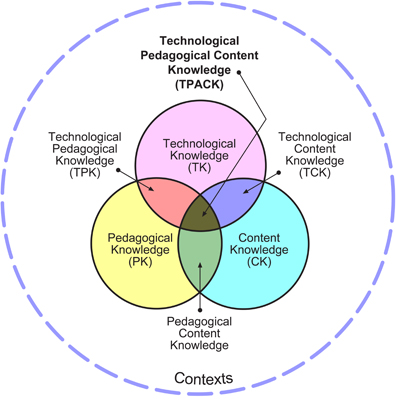
I have become a fan of the TPACK model as a way to frame my conversations with teachers in a way that allows us to focus on good instruction first, supported by technology.  I call the center part where all three overlap as the "sweet spot" - we want to make sure that we are considering all three aspects when going through a coaching cycle... and just because I'm a "Digital Learning Coach" doesn't mean we start with the Technological side first ;)


It was pretty exciting when my team took another look at our district's "TUSD Connect" Focus, which is:

We realized that TUSD Connect and TPACK go hand in hand!  Our district's vision aligns almost exactly with the TPACK model.  Now TPACK isn't just something "new" to talk about with teachers, it's just another way to support the conversation that has been happening for the last several years at our district.

I worked a lot this summer on gathering good questions to help support each of these three parts of TPACK... how can I guide a teacher through the reflective process in planning, implementing, and debriefing through the lens of content, pedagogy, and technology?  You are welcome to view my template of questions (which is still a work in progress) by clicking here.

[Please note that my questions have been accumulated from all over - web searches, in person conversations, etc... I can't take the credit for most of them :)  However, having them organized within the frame of TPACK has really made them more useful for me.]


Category
Pre-Brief  (Date: ______)
Debrief (Date: ______)
Content Knowledge: What content / standard are you teaching?


Pedagogical Knowledge: How will you engage your students in learning?  What are you trying to do?


Technological Knowledge: What tools will allow you to accomplish your goals?


Reflective Focus / Essential Question: What will be focusing on during the implementation / observation that we will reflect on before, during, and after the coaching cycle?


I have found that having a reflective focus helps to serve as the "third point" in conversations because it is something the fellow chooses and it's centered around a content, pedagogical, and/or technological goal.  It allows us to look to that as our measure of "success" and helps build the capacity of the fellows to begin reflecting throughout the entire journey.

It's important to mention that a coaching conversation does not go through ALL of the sample question stems.  However, having a "toolbelt" of good questions to ask helps me to guide the conversation and ensure deeper reflection.  While I can't generally plan ahead for the questions I want to ask for a pre-brief, I will look through the debrief questions and pick out some specifically to talk through in our post-implementation conversation.

How do you structure your coaching conversations?  Do you have question stems and starters that you use to help guide the conversation?  Do you utilize a model like TPACK or something else?

This post is a part of Kathy Perret’s #EduCoach Blog Challenge. You can read more about it here.

Saturday, September 19, 2015

My Life as a Digital Learning Coach - Week 3 Reflections (Year 2) - VERSO APP & DAN MEYER

See all my posts on Coaching on my Coaching Page

This was an abnormal week for me.  Monday and Tuesday I was on my campus, but Wed-Fri I was out at two different trainings.  Because of that, I met with 9 of my 11 fellows over the course of 2 days rather than 4.5 days.  I'm really excited though, because with most of them we will be starting our first "coaching cycle" next week.  Most of them are utilizing Google Classroom and feeling more comfortable & excited about the potential with it.  I also feel like I've been able to communicate the "TPaCK" model of looking at technology implementation well, where it's not just sticking a tech tool in there, but really thinking about what they are teaching, what their goals are in teaching it, what they want to see students learning or doing, and THEN really plugging in the tool that will help accomplish those purposes.


The rest of this post will focus on what I learned in the trainings I attended:
Wed / Fri - Verso App
Thurs - Dan Meyer

On Wednesday and Friday, Phil Stubbs from Verso came out and trained all of our district's coaches for a pilot of the Verso Campus, which is a way to be able to see the data across sites, subject areas, or basically whatever type of "campus" you choose to set up.  I was familiar with Verso from using it with a fellow a couple times last year (and I had met Phil at FlipCon14 in Pennsylvania), but it was really great to see the pedagogy behind it and understand its purpose so much more.  Verso is definitely something I would have used in my flipped classroom, had I known about it before I left the classroom! (I say that about so many things...)

A few highlights of things that I really like about Verso:
  • Verso is an app that really gives students a voice in your class.
  • Students cannot view other respondent's answers until they post, which means the discussion posts are students' original thoughts.  In addition, it gives students time to really think and construct their own ideas before reading their classmates' thoughts.  Teachers can set this threshold to be up to 3 posts before seeing others'.
  • Student responses are ANONYMOUS to other students.  The teacher can toggle between teacher and student view (so you can display the results with no names, but also look at them on teacher end with names).  This lowers the "fear" and really allows students to just be honest, open, and do their best work.
  • Verso is not just a discussion board, but something that will take the level of learning from SURFACE to DEEP.  If you look at the picture below, you can see that it starts off being unistructural (one student's idea) to multi-structural (lots of ideas from multiple students but they aren't really connected together) to relational (start seeing how the pieces fit together, students commenting and making connections on each other's posts) to extended abstract (can extend and apply ideas to new ideas)
P.Stubbs, Verso

  • The teacher can group student responses based on the learning activity need or purpose.  This allows for that deeper discussion, connection-making, possible remediation or redirection, or whatever is needed in class.
  • It's not “E-Learning”, but “C-Learning”.  It's way too easy for teachers to say, “Oh, she’s the ‘e-learning’ person, that’s not for me”.  They can’t really argue with the “C-Learning” goals…(critical thinking, creativity, collaboration, communication, character, citizenship)
  • This isn't just a feedback tool. It's a feed up (where am I going? - ahead of the lesson, a signpost of what they will be learning), feed back (how am I doing? - authentic evidence of learning because it's the students' original thought) and feed forward (where to next? - providing feedback that moves learners forward)
  • We want students to connect the dots in their learning, but "you can't connect the dots without first collecting dots". Verso helps students to collect the dots and begin connecting them, and then allows for even further and deeper connections as the teacher designs.
  • A learning community is NOT about pursuit of individual learning goals,it's also about contributing TO the learning & knowledge base of colleagues & school.  Verso is socializing the change- the collective might of sharing and working together. This is what Verso Campus allows.

If you haven't checked Verso out, I would highly recommend it.  It's free to use; the data that helps to "socialize the change" is what Verso Campus is all about and that is the premium part. 

Here are some more quotes from the day that I tweeted out:


On Thursday, I had the privilege of attending Dan Meyer's workshop that was hosted by a nearby district. 
Dan brought up three misconceptions that math teachers generally have about how to engage students in difficult mathematics.  The misconceptions were:
1. For math to be interesting, it must be real-world
2. Math should be related to a career (job-world) - "when will I ever use this?"
3. You must design lessons around things that interest your students; not just real-world but their real-world; the "relatable world"
Instead of these three misconceptions, he argued that we should strive for these three things:

1. Start a fight - choose things that allow for "constructive controversy" where students are sharing guesses or given opinion-based questions that math can help to answer or clarify.

2. Turn the math dial up slowly - this allows for ALL students to access the math.  Start at stage 0: watch a video.  All students can do this.  Then Stage 1: Ask a question.  Stage 2: What's your estimate?  Stage 3: What info do you need?  This gets students hooked and engaged and they haven't even done "real" math yet.

*One strategy for how to do this is to "Delete the textbook".  Take a problem (think those word problems or application problems with lots of text, a diagram with lots of numbers, and parts a-d of questions) from your textbook and delete the majority of the pieces around it, leaving students with an accessible image with little extra information where they can enter the problem more easily.  You then add in the "deleted" pieces slowly, asking more interesting questions as you go.  You want to start controversy and drive interest and start a conversation around the problem.

3. Create a headache - Dan's been blogging about this idea over the summer, and I've enjoyed his posts.  If __________ is the aspirin, then what is the headache?  I'll leave you to his blog to read his examples of this.


Saturday, September 12, 2015

My Life as a Digital Learning Coach - Week 2 Reflections (Year 2)

See all my posts on Coaching on my Coaching Page

Time flies when you're having fun, right?

I'll start with the highlight of my week.  I was coming into work on Thursday and ran into a fellow on my way into my office.  She asked me if there was any way she could digitally collect student responses using something like "clickers" to some multiple choice questions so she could easily calculate the percentage of students who had gotten it right.  My response - why, of course!  We had about 15 minutes until class started so I asked if she wanted me to set something up for her to try during 2nd period, and she was all for it.  We used Socrative's quick question feature, which basically requires no setup.  She projected the questions on her document camera and students just saw answer choices A,B,C,D,E on their screen.

It was a coincidence that I actually had 2nd period free on Thursday, so I was able to visit her class to provide support.  We didn't get to do much prebrief or talk pedagogy or any of that, so I was interested to see how she was going to facilitate it.  It ends up that Eric Mazur came and spoke at the school several years back and she learned about his Peer Instruction strategy.  It was so awesome to see another teacher model the Peer Instruction strategy, and it was made so much more effective by the use of Socrative.

Here's what she did:
1. Put the question up on the screen, asked students to respond.
2. She looked at the data as it was coming in to see if she had a high enough percentage of students getting it right (60%-ish) to do the next step.
3. Students were NOT told what the answer was (one of the benefits of not projecting the Socrative Teacher Screen and one of the downsides of using Kahoot like I did in my classroom several years back), but had to find someone that had a different answer than them to try to convince of their own answer. 
4. After about 2-3 minutes, the teacher re-asked the quick question on Socrative to see if there were different results.

At this point, she may show the Socrative results on the screen (if the majority of students now got it right).  She may ask some more probing questions, have them do some more discussion, do a little focused instruction, and then re-ask.  She really had so many options based on the student data she was gathering.

Halfway through 2nd period, I had her download the Socrative teacher app so she could walk around the room and be seeing results coming in live rather than having to look at her teacher screen. 

We got to very briefly debrief the activity before she did it again for three more classes.  Before tech, she would have had the students hold up their answers on whiteboards.  She would have had to try to calculate a rough percentage in her head, and students could easily "cheat" and see what their classmates were putting on their board.  Or, she might have just given all of them the problems in a packet and given them time to work through them individually and then time to ask each other questions or address them as a whole class.  However, with the tech, she was able to do so much more with the data and facilitate a much more rich, engaging, student-centered learning environment.  As my colleague Andrew has said, the tech allowed her to Capture, Sort, Assess, and Discuss student thinking.  Loved it!

We get to meet as a DLC team once a week on Wednesday mornings.  One hour of that time each week is structured for a "round table" discussion where we can bring whatever we need to talk about to each other.  We use Slack as a communication tool throughout the week, which has been hugely helpful in keeping us connected and asking a lot of questions throughout the week.  Then, the things that we still want to discuss in person can be brought to the round table.  This week was our first round table and it was really valuable.  We were able to share about how we are organizing stuff for our fellows, what our first meetings are looking like, and other issues or best practices we have come across in the last week.  I'm really looking forward to this time every week.

One of the biggest tools we are all learning more about is Google Classroom.  Our district had it blocked at the beginning of last year so I never really started exploring it.  I learned Doctopus and became a huge Doctopus fan.  While Doctopus still has some features that GC doesn't [yet!], such as the ability to push out collaborative documents and the easy rubric grading right there, I am really going over to the GC side of things.  The tweak for collaborative documents (only have one group member open the template, share it with the rest of the group members) is not that difficult.  As I've played with it more and more from both a teacher side and student side, I can really see GC being the "Kool-Aid" that teachers will drink to get them a little more hooked on tech in a positive, purposeful, effective way. 

I did a training on Wednesday afternoon on using our Epson Interactive Whiteboard.  The teachers have had them for years, but never really learned how to use them.  I was somewhat familiar with it, but I definitely had to brush up on my skills.  It was lovely to find out 30 minutes before my training that the toolbar installed on most teacher's computers can't be downloaded anymore - you have to get an updated version which looks a lot different.  The new toolbar has a lot of better features and is a little easier to manipulate, but I didn't have the time to play much before the training :)

Anyways, with anything like this, I did my best and the 14 teachers that showed up learned more about the whiteboard, got hands-on practice (I had 3 classrooms available to use), and then at the end I showed them the new version they could download.  When I went home that night, I made a 7 minute screencast on all the new features and then followed up with teachers the next two days on calibrating their projector and getting them started.  

So, interactive projectors used to be all the hype, and I know why a lot of teachers don't use them (the pen does take some getting used to).  However, even the simple fact of being able to highlight over text and then save images of what is on the projector to post on Haiku for future reference really does add value to it as a tool.  I hope to see more teachers using it for the times in class when they are going over instructions or delivering some focused instruction.

Last but not least, one of my favorite new tools is GoFormative.com.  I always call it "Go Formative", but it's really just "Formative".  They just released (today) their updated Summary view on their live results page.  Still some quirks and stuff but overall a tool I'm very excited about in terms of capturing student thinking and student data in a way that can make a difference in teaching and learning.  If you haven't checked it out, do it now! :)

Until next week... I'm on a 2 week roll now ;)

Monday, September 7, 2015

My Life as a Digital Learning Coach - Week 1 Reflections (Year 2)

I've wrapped up my first "official" week back to work, starting my second year as a Digital Learning Coach.  "Official" means that I've been back sporadically for pre-school events since August 10th, but now the teachers are back and students started last Tuesday.

The beginning of the year has been much crazier than last year, and I really think it's because of the relationships I was able to build with teachers over the course of last school year.  At this time last year, I was brand new, was just figuring out Haiku (our LMS) and everything else myself, and didn't really know anybody.  Now that I've built the foundation with the teachers at my site, they are much more comfortable coming and asking for help, whether it be a quick question or something more involved.

[For those of you that are new to my blog... My role as a Digital Learning Coach has me at one high school site 4.5 days a week (the other .5 day I'm with the other DLC's across the district, there are about 12 of us for grades 6-12, 6 middle schools and 4 high schools).  I support all of the teachers at the site (110) but specifically focus my work on teachers that have applied to be "fellows" in a year-long Tech Fellowship.  This year, I am working with 11 teachers: 5 math (3 of them as a group, the other 2 individually), 2 social science, 3 English, and 1 Science.  You can read a little more about my coaching setup and other details on my Coaching Page here.]

On Monday, which was a Teacher Work Day, I opened my schedule up for my new fellows first, and ended up being booked solid from 8am-3pm (with a 15 minute lunch :)), working with 10 teachers, 8 of them being new fellows.  Most of them were just getting set up for the year, needing help on Haiku or Google Classroom.  However, with a few of them we actually designed some "First Day of School" activities using Padlet. 

For the Padlet Activities, students wrote their name with an adjective (you know, like "Creative Crystal" or something like that), wrote something about them (one teacher had them write 3 facts about themselves, another had them write the best part of their summer), and then take a selfie with their webcam to post to the wall.  Both teachers who used this activity loved it and said the kids were engaged.  In addition, they were able to get to know the students more quickly, as well as the students learning about their classmates.  They used the privacy settings to "Moderate Posts" so the students didn't see each other's posts until the teacher approved them.  This allowed the students to not be as apprehensive in posting their picture because it wasn't going to appear right away - they would have time to "retake" it if needed.

Google Classroom was presented at our Summer Institute and there are a TON of teachers (fellows and non-fellows) on board with using it.  While I still love my Doctopus (mainly due to the ability to push out documents in groups, the ability to view assignments both by assignment and by student, and the ease that Goobric is with it), teachers that have not really used Google Drive with their students before are jumping all over it!  There is so much potential for transformative, formative, feedback-based instruction when students use Google Drive for their work.  I'm very excited for this, if you couldn't tell :)

On Tuesday, we had a training with our team of DLCs, and we had some great discussions and did some activities to help frame our work for the year.  Our "Word of the Year" is YET, which goes along with the District's summer reading book of "Mindset".  We are not perfect, we are still growing, we are not there... YET!  

One of my favorite activities was a Communications Style Survey / Discussion, which you can find here.  I am dominantly a Thinker, and it was great to reflect on the strengths and weaknesses of my dominant communication style and how to improve communication with those of different styles.  I am doing this survey with my fellows over these first few weeks as well.

Wednesday started my first "real" day on site.  Thankfully I did not open up my calendar to teachers in the morning because I had plenty of work to get done.   Over the next 3 days, I met with 18 teachers in person, worked with 2-3 over the phone, and countless more via email.  I've decided to continue using Doodle for my appointment calendar for non-fellow teachers to schedule time with me.  I've found it very easy to add to my calendar each week (I try to be scheduled about 2 weeks in advance), and I get an email (and a push notification from the Doodle app on my phone) anytime a teacher signs up for a time.  I do have to manually add it to my calendar, but otherwise it's very simple.  I did try using Google Calendar appointment slots last year, and I just ran into too many kinks that I tried Doodle and liked it. 

I was able to have my "initial fellow meeting" with nine of my eleven fellows this week.  The purpose of the initial meeting is to have a conversation, get to know one another, and launch some ideas for the year.  My initial meeting had three main parts:

1. Conversation about Coaching Experience & Expectations
I gathered different questions from multiple books and resources this summer and had an informal conversation with my fellows.  I didn't ask every question to every fellow, but I did take notes as we talked so I could remember the key things they said.  I didn't use these questions last year so I didn't know exactly how it would go.  I ended up being really happy with how it opened our discussion and set the focus for the year. Some of the questions I found very useful were:

  • Have you worked with a coach before?  If so, describe your experience and what did / did not work well.  What has prompted you to explore coaching now?
    • Most of my fellows had worked with a coach in a non-academic capacity before, such as in athletic coaching, and we were able to begin to make the connection between their role and my role.  I like how several fellows said the coach "Gave her exercises to do, babysat her while she did them and helped her through it, and would tweak things if she wasn't doing them correctly in order that she would do them more effectively". One even mentioned the coach "anticipating where he would go wrong, knowing the pitfalls and trying to avoid them."
    • Some quotes (paraphrased / summarized):
      • "I don't know what I could do with what I already do to transform it in a technological way"
      • "I see all the things other teachers are doing and want to do it as well.  Coaching gives me somebody to teach me and walk me through it so it's not so overwhelming" 
      • "I want ways to make things easier - I'm not 100% sold that all "this stuff" will make students more successful right now"
      • "I always want to be growing and learning.  I don't feel comfortable jumping in and exploring myself because I need to be taught more.  I get overwhelmed by too many ideas because I think I should know them all right now and put too much pressure on myself.  Coaching will help with all of this."
      • "I'm comfortable with technology and like what it has to offer, but want to be held accountable to go and explore more things with a little more push.  I'm more interested in how the technology actually affects pedagogy and less just how to use it."
      • "I'm always learning and want to maximize the way I do things.  I want more hands-on practice beyond just a conversation."
      • "I'm a huge fan of tech but want to be able to combine that with my love for teaching.  I want to use tech in a meaningful way, but not just use it to use it - it needs to benefit my classroom."
      • "I like having the support and consistency of meeting, as well as the positive accountability that coaching provides."
  • What are you hoping to get out of being coached?  What do you hope your students will learn as a result of our work?
    • This is a great question to see where they are at - do they see me as a "tech-fixer", do they see the bigger picture of how technology should support pedagogy?  Do they see the connection (and importance) of impacting student learning?
    • Some quotes (teacher gains)
      • "I don't want to learn 500 things and not remember any of them.  I want to practice the same things over and over again to get good at them" 
      • "I want to not be afraid of using new things anymore"
    • Some quotes (student gains)
      • "Students gain resourcefulness from using different tools and use that to their advantage"
      • "Allow students to think at a higher level, engage them more, less busy work, be curious"
      • "Make learning more meaningful for students, improve engagement, improve student self-direction in their learning"
      • "Give them a more rich / dynamic experience; allow them to organize things to their advantage.  Have them know how to use different apps / programs more fluidly so they can focus on the learning."
  • What is your understanding of what coaching is and what my role is?
    • I phrased this more like, "If somebody walked in that didn't know me or my purpose, how would you explain my role and purpose to them?"
    • This was another eye-opening question to see how much they understand the big picture of my role.  I was very happy to not hear things like "fix my tech problems" - most if not all of my fellows saw at least some aspect of the pedagogical / technological connection. 
    • Some quotes:
      • "A person knowledgeable in technology that also taught math who can show us how to incorporate tech with both routine stuff (help the teacher) and with the content (help the teacher help students)"
      • "Can help me learn how to make tech and math complement each other instead of clash with each other"
      • "Expose me to the technology that is out there and then help me learn how to effectively use the ones that I choose"
      • "Assist me in creating and implementing lessons that have new technology in my classroom.  Show me tools that I didn't know existed and help me figure out why to use different tools."
      • "Someone who is 'more expert' in technology than me that I can have conversations with about pedagogical approaches and can act as a sounding board for thinking through ideas."
      • "Give me support in new ideas and ones that I have had little thought on; a resource so she can stop focusing on the 'annoyances' of technology and actually be able to use it in my lessons."
  • What concerns do you have about our work together this year?  What challenges do you foresee us facing?
    • Different challenges mentioned were time, pressure (internal and external), concerned if things don't work having to go back and reteach, concerned about making sure the line between "tech support" and "coaching" is clear, being able to give appropriate feedback with larger class sizes, making sure students actually bring the technology with them.
  • More individual / personal questions:
    • Is there anything I should know about you that would help me in my work with you or make our work more effective?
    • What do you know about the way you learn and communicate best that would be important for me to understand?


2. Explanation of Digital Documents on Haiku and Google Drive
I pushed out several different documents to them at the beginning of the year for our work together.  I talked them through the organization (all the Google Docs are embedded on Haiku as a type of portfolio for the year) and the purpose of several of the documents we'll be using throughout the year.  This was fairly brief and I just wanted them to see that the documents on both sites were the same, understand the "running documents" we will keep throughout the year (agendas, lesson plans, tech toolbelt, sharing log, and journal) as compared to ones we will look at just as we get started and set the stage ("first meet" discussion questions, coaching focus, norms, tech proficiencies, classroom management plan)

3. Our Purpose, Commitments, and Plan for the Year;

  • I explained how I describe my role to others, which for a lot of them closely aligned with at least some of their comments:
    • To develop technologically self-sufficient teachers
    • To enhance teaching and learning by effectively integrating technology into the learning activities
    • To facilitate a non-evaluative, collaborative partnership always seeking to improve teaching and learning.
  • I talked about the non-evaluative relationship we have and that they will see me talking to admin about whole-school issues but our coach-fellow relationship is confidential.  While there is already a foundation of trust between me and the fellow since this is my second year at the school, I still feel like it was important to address up front.  If I had any fellows that were brand new to the school and didn't have a previous relationship with me, I may go into this a little bit more and do some more trust-building.
  • I explained the coaching cycle [prebrief - implementation - debrief] that we'll start in a couple weeks after we work through the foundational "big picture" technology.
  • We looked at how TPaCK relates to both our relationship and how we approach things.  I told them the "sweet spot" is where content, pedagogy, and technology all overlap and that both of us bring different strengths in all three of those areas. Our goal is to work together to enhance all of those areas and make sure we consider all three when planning lessons.  I described the way we approach lessons is, "What content are you teaching?", "How are you planning on teaching it?", and then "What tools would support / improve / enhance what we want to accomplish?".
  • I gave them a "homework assignment" to begin reflecting on some pedagogical focuses for this year.  I asked them to come up with at least one "big idea" focus to start the year off (although it will change throughout the year and with each coaching cycle).  This will help to launch our discussion next week as we continue to get to know each other, talk through some different topics such as Norms for our meetings, Classroom Management with Tech plans that they have, the importance of reflection and how that will look this year, and begin working on the "tech proficiencies", which are the "big picture" things that will be used throughout the whole year like Haiku, Google Drive, Google Classroom, etc. 

This first week really was great and I'm looking forward to working with all of my amazing fellows this year.  I hope to continue to blog once every 1-2 weeks... we'll see how it goes this year :)

Tuesday, July 28, 2015

Tech Toolbelt - Is it holding you up or weighing you down?

As the year went on, I started to develop a "Tech Toolbelt" for teachers of different subject areas. I found it helpful for me when working with them as a point of reference, and a way for technology to not be as overwhelming to teachers because they only need a few good tools in their toolbelt to start off with. I have only shown this to a few teachers directly; I mainly use it as a point of reference for myself as we begin our conversations.

Please note: just because there are "#" tools in the "Math Toolbelt" doesn't mean every math teacher needs all "#" tools.  They are just tools that I have found to be effectively used in that subject area.  There is a lot of overlap between subject areas as well.  I'd rather have a teacher have 2-3 tools in their toolbelt that they use really effectively and efficiently, than a bunch of tools that they don't use well.  (This is one of the reasons this document is just a point of reference for me to have in conversations and not a document I share with teachers openly).


 In addition, if your tech toolbelt gets too full because you are just trying every latest thing you hear about, your pants might just fall down!  (meaning the belt isn't doing your pants any good in holding them up, instead it's just weighing them down!)  Technology should be used to improve and enhance the teaching and learning in your classroom, not just used to "being using tech".  Teachers can reflect on the 4 E's when considering any of the tools in this list.

 At CUE2015, Jon Corippo said that it's hard to introduce students to new tech & new content at the same time. He suggested that we introduce students to new tech with something they are already familiar with. I came up with a list of ideas (definitely not fully finished, so please add any suggestions you have!) of ways that teachers could introduce new tech to students in non-content specific ways so they could get familiar with the tool. That way when they use the tool with content, they can focus on learning the material and not on figuring out the tool.

 This document is a work in progress (see below or access on Google Drive here). I'd love any ideas of things for the "beginning of year" or tools I'm missing that you think are crucial.

 
Related Posts Plugin for WordPress, Blogger...