Monday, March 20, 2017

#CUE17 Takeaways - as told by my tweets

I had a great time sharing and learning at #CUE17 this last Thurs-Sat.  While I was busy presenting (4 sessions and 1 workshop this year!) a lot of the time, I was still able to attend the keynotes and 2 concurrent sessions.

The keynotes by Jo Boaler and George Couros left me feeling, "All my teachers need to hear this!!"

 I also appreciated the questions that attendees posed in my questions that furthered my thinking and continued to expose me to other perspectives.  You can see all my session resources at 2017.cue.org

Here are my tweets that show my biggest takeaways from the conference: 


 Comment: "I'm not really into tech"
Answer: "It's not about U,it's about the kids!"
Stop using excuses 4not innovating in your clsrm! #cue17
— Crystal Kirch (@crystalkirch) March 17, 2017


Purchase my book today!  Click here for more details and to place an order!  Also on Amazon.com at bit.ly/fwkirch

Saturday, March 18, 2017

Screencasting our Train of Thought (GUEST POST)

In my role as a Digital Learning Coach, I have the privilege of working with teachers ("fellows") supporting them in finding ways for technology to improve / enhance the lessons they teach with the goal of better & deeper student learning. Several fellows have taken the leap to blog about their experiences and share specific lessons with all of you. I hope you benefit from reading about their journey.

This is cross-posted from techfellowship.blogspot.com

Guest post by Ms. Tala Pirouzian, High School ELA Student Teacher

My name is Tala Pirouzian and I am a student teacher in the English department at Beckman! As a former student of the school, I love reflecting on the educational changes that have occurred over the past few years. One change that I find to be powerful, valuable, challenging, and engaging is the role of technology in the classroom. As my mentor teacher, Erin Thomas, and her tech coach, Crystal Kirch, discuss when and how to bring the tech into the classroom, I am continuously reminded that the purpose of using technology is supposed to be to support students’ learning by making instruction more engaging and effective. Thus, I have found it to be a form of litmus test in that before a teacher uses a tech tool they determine: what purpose does it have? is it the right tech? how are students going to experience and learn from it? how is instruction going to be enhanced?
One lesson that I am eager to share with others involved using a new (new for me and my students this year) tech tool, “Screencastify,” in order to analyze author’s craft. As students develop and practice their close textual analysis, we added a new layer to their annotation and analysis by asking them to use the “Screencastify” extension. This tool was supposed enhance student learning in that as they “draft talk” their way through their analysis, they will be better equipped to write about it.
First, I posted a model screencast (about 5 minutes) in which I commented on why I annotated specific parts of the passage and then authentically verbalized my analysis of the passage.
Here is a screenshot of my sample. Feel free to listen to it here.
During the lesson, my students students selected one of nine passages from the text to annotate using Google Drawing or Kami, and then they used the “Screencastify” tool to make their “thinking visible.” This is one of the most significant and valuable parts of this lesson in that the tech tool gave all my students the opportunity to voice their thoughts and understanding. Furthermore, they were all using the content language as experts in the discipline would! As I watched and listened to their screencasts, it was like a window into their reading minds. Sometimes we highlight or mark the text without taking the time to rationalize and reflect on it, which also leaves the teacher asking why did you annotate what you did? Or what made you think that? This tool asked students to explain what they were highlighting or marking, and why.
Here are some sample screenshots of students’ annotations, which they provided a screencast of:


The screencasts range from 3-5 minutes. Following this, the students used their annotations and screencasts to write a short close textual analysis.
Here is a sample written work (with peer feedback):

As I reflect on this lesson, I realize that such technology not only serves to improve students’ digital literacy but also enhances their content skills in that they are annotating the passage using Google Drawing and Kami, communicating their interpretations and organizing their analysis via the “Screencastify” extensions, and then creating a written product. This offers students a chance to demonstrate their learning in different ways.
I definitely recommend this tech tool to others because it truly does make thinking visible in an innovative and effective way. I am so eager to try out different technology in the classroom and read about the ones you all are using!


Purchase my new book today!  Click here for more details and to place an order!  Also on Amazon.com at bit.ly/fwkirch

Friday, March 10, 2017

Turning Online Discussions into Meaningful Class Conversations (GUEST POST)

In my role as a Digital Learning Coach, I have the privilege of working with teachers ("fellows") supporting them in finding ways for technology to improve / enhance the lessons they teach with the goal of better & deeper student learning. Several fellows have taken the leap to blog about their experiences and share specific lessons with all of you. I hope you benefit from reading about their journey.

This is cross-posted from techfellowship.blogspot.com

Guest post by Ms. Erin Thomas

I am not a techy person by nature. The latest gadgets, fancy apps, and social media aren’t really my thing, so when I decided to commit to being a tech fellow this year, I was nervous about how things would go. One of my biggest concerns was that the technology I brought into the classroom would become a distraction from the actual learning I wanted to take place. My tech coach vehemently assured me that we would only bring in technology when it made sense and would serve to enhance the lesson I had planned.

A couple of weeks ago, I put her assurances to the test. I told her I wanted to find a way to take an online discussion and push it out into the classroom. I was curious if I could find an effective way to make a online discussion meaningful to their person-to-person interactions in class. The lesson series took a total of three days: one day for the online Verso discussion, one for the in-class 4 Corners discussion activity, and one for miscellaneous post recap and reflection which I wanted them to do. More information can be found about this style of discussion in Catlin R. Tucker's Creatively Teach The Common Core Literacy Standards with Technology


I decided to keep the online discussion fairly broad. I had them respond to two questions about the reading, with the goal being to simply get them warmed-up for their in-class discussion. They were asked to make both an initial post with their response to the question, and then one response to one of their peer’s responses.


That night for homework, I had them respond to a Google Form survey HERE which required them to write two open-ended questions based on their online discussion. My plan was to pull at least a few of their questions and use them in the Four Corners discussion in class the following day. This extra step really increased their buy in the day of the Four Corners activity. They were excited to see their questions from the form form filtered into the different rounds of discussion.

The in-class discussion took a fair amount of set-up to get everything into place, so they could participate in the in-class discussion I had in mind. My goal was for them to participate in four different, ten minute discussions, each with its on focus and questions. Each round they would move to a new table and would meet with a new grouping of their peers.


With the help of my amazing tech coach, we set-up a Google Sheets which organized them into groups, rounds and discussion roles. Students were given the Google sheets the day before the in-class discussion, so they could come to class prepared to make the numerous transitions as smoothly as possible. One adjustment I made to this portion of the lesson when I did it the following week with my CP students was to have them write down their assigned roles and rounds on a handout I created. This eliminated some of the issues my honors students had with forgetting where to go. CP Handout


The day of the discussion went great! It was so exciting to see them moving around and interacting with so many of their peers in one class period. My honors students tend to be really strong in discussion, but I had the same level of participation from my CP students a week later. As a teacher, I want to create opportunities for my students to think critically about a text and to articulate that thinking through meaningful discussions. The online discussion, partnered with the in-class Four Corners activity, did just that.

I did do a twenty minute recap of the information covered during the discussion with my students the following day, but it was mainly just a way for me to solidify what I observed them talking about in class. Additionally, I had them complete a final Google Form reflecting on the process HERE , their participation, and the relevance of the online discussion. The feedback they provided was enormously helpful when I went to set the same lesson series up for my CP students. In addition to the adjustment I mentioned earlier, I also chose to eliminate the role of “time keeper”, it felt fairly irrelevant to me during the discussion, and their responses confirmed that thinking.


The vast majority of my students indicated on their Google Form that they preferred this lesson series to the typical Socratic Seminars we have on a fairly regular basis in my class. Many of them shared that they felt more confident participating in this type of discussion, and that having the online discussion in advance of the in-class activity helped them to feel more prepared.

On a purely pedagogical level, I was really pleased with how this lesson turned out. While it was a bit labor intensive to complete all of the set-up required to make the Four Corners discussion run smoothly, it was completely worth it. I was so happy to see my students show how independent they can be of me while having a sophisticated, academic dialogue with their peers. And I was even more excited the following week to watch my CP students find the same success.


I still wouldn't say I am the most "techy" person, but I have learned to really enjoy it. I have seen how it can make a lesson I have planned more dynamic and engaging, while also allowing me to be creative and innovative as a teacher.


Purchase my new book today!  Click here for more details and to place an order!  Also on Amazon.com at bit.ly/fwkirch

Wednesday, March 8, 2017

Scaffolding Reading Comprehension in a Foreign Language Class


In my role as a Digital Learning Coach, I have the privilege of working with teachers ("fellows") supporting them in finding ways for technology to improve / enhance the lessons they teach with the goal of better & deeper student learning. Several fellows have taken the leap to blog about their experiences and share specific lessons with all of you. I hope you benefit from reading about their journey.


~~This is cross-posted from techfellowship.blogspot.com~~


I wanted to share a lesson from one of my fellow's classes.  Helping students in Spanish 3 to get comfortable with reading their first novel that is fully in a foreign language requires a lot of support and scaffolding.  Not only do they need to understand grammar and vocabulary used throughout the novel, but they also must be able to piece everything together enough to comprehend the storyline. 

To facilitate this learning, we decided to utilize several instructional strategies (both with and without tech) that would allow students to process their reading.  As students worked through the novel, we tried to utilize different strategies (matching with each of the four goals below) to keep students on their toes and to keep things fresh.


The goals for the novel & strategies to help meet each goal.


STEP 1: Prepping for Comprehension + Working with Vocab / Verb Tenses

Before reading the first couple pages, students read a summary passage that one of last year's students had written. Using GoFormative, they edited the passage for grammar, verb tense, and agreement. In addition to exposing them to new vocabulary and helping them build their skills around using the correct verb tense, reading the summaries helped to prepare their minds for what they would see next.


STEP 2: Reading & Annotating chapter (supported with TPR)


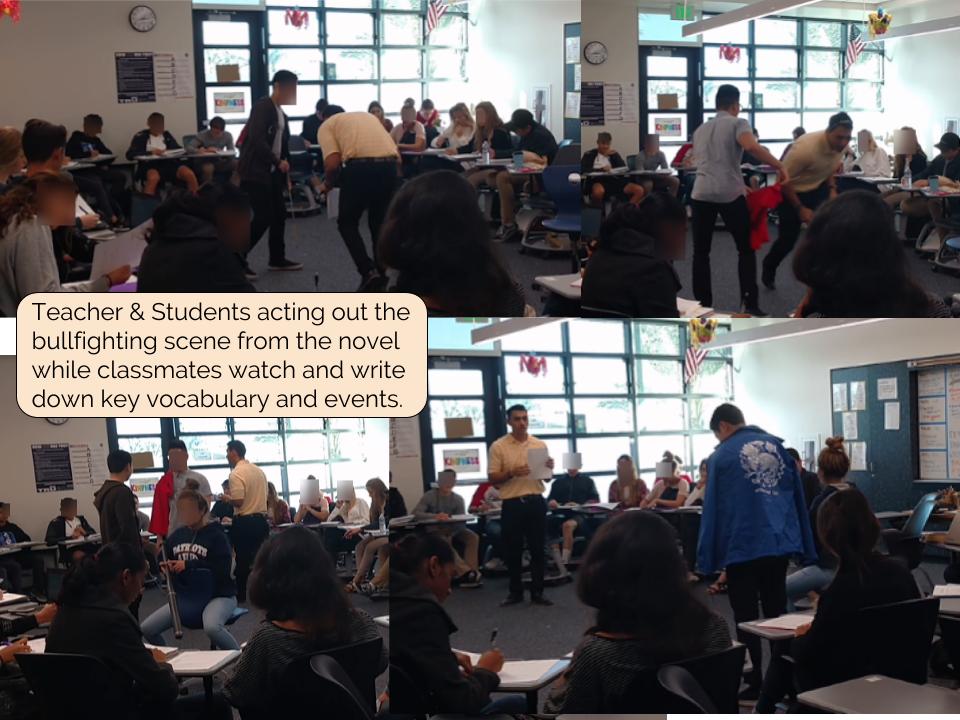
While students could have used Google Docs or Kami (PDF annotation) to read and annotate the novel, we wanted them to do this on a hard copy so they wouldn't have to be navigating between multiple screens for the upcoming activities.  In addition, because this is their first exposure to reading a novel completely in a new language, we wanted to keep the "comfort" of being able to read and annotate with pencil & highlighter.  After reading and annotating the first 4 pages of the novel individually, the students reviewed the events they had just read about through a TPR "Total Physical Response" activity, where Mr. Miranda guided the class in "acting out" what had happened.


STEP 3: Sequencing Key events together


Students then got in collaborative groups to put together a sequence map of the events in the novel. Utilizing Google Drawing's Explore feature, they were able to bring in images that helped to communicate what was happening in the story.  The goal of building the Google Drawing was to ensure students had a level of comprehension of the key events in the novel.


STEP 4: Writing about the key events in the chapter & Analyzing vocab / verb tenses

Lastly, they used Verso App to write their own summary, taking what they learned from the sequence map and putting it together in complete, comprehensible sentences, focusing on the vocabulary and appropriate verb tense. Once all students submitted their summary, they were assigned another student (Verso App keeps student names anonymous) to critique, evaluate, and make recommendations for how to improve their writing.  Because all posts in Verso are numbered, it was easy to give each student a number corresponding to a different post to evaluate.

One of the challenges is getting students to summarize in their own words and not just take key phrases from the novel.  To overcome this, we had to make the Verso response a "closed text" response (can't have the novel out).  Students could still access their Google Drawing sequence map to help with their writing.


alternate STEP 4: Speaking about the key events in the chapter


Using either Let's Recap or Adobe Spark, students summarize the key events in the chapter orally rather than in writing.  With Let's Recap, Mr. Miranda just saw their face via webcam, which allowed him to watch their pronunciation.  With Adobe Spark, students brought in images to aid in telling the story of the chapter.  You can see a sample Adobe Spark here.  The students recorded them in class, so there is background noise.  However, that does not take away from the goal of the activity.

Overall Reflection:

Students found most of the activities helpful (either "a little" or "a lot").  They were most uncomfortable with activities that forced them to speak (using Adobe Spark or Let's Recap), but that is a goal they are working towards and should get more comfortable over time. 


Purchase my new book today!  Click here for more details and to place an order!  Also on Amazon.com at bit.ly/fwkirch

Tuesday, February 28, 2017

Desmos in ELA...Isn't that a math tool?

In my role as a Digital Learning Coach, I have the privilege of working with teachers ("fellows") supporting them in finding ways for technology to improve / enhance the lessons they teach with the goal of better & deeper student learning. Several fellows have taken the leap to blog about their experiences and share specific lessons with all of you. I hope you benefit from reading about their journey.

~~This is cross-posted from techfellowship.blogspot.com~~

In an 11th grade Honors English class this past week, students were discussing Chapter 5 of The Great Gatsby with a focus on the different symbols throughout the chapter.

We designed a Desmos Activity that allowed the students to work through the potential symbols collaboratively in groups of 4.   For each element, they had to decide between "symbol" and "not a symbol".  Once they selected their choice, they were prompted to explain their reasoning with textual evidence.  After they submitted their explanation, they were able to see up to three other group's explanations before moving on.  The activity was student-paced so all groups were working at different paces and were able to take the time they needed to think through their responses without the pressure of being "moved on" with the rest of the class.


As they worked through the activity, the teacher was able to monitor student thinking through the Desmos Teacher Dashboard.


After the groups finished working through the Desmos activity, they were given the link to an individual hyperdoc that had mini-screencasts where the teacher recorded herself explaining whether or not each element was a symbol or not.  Students then were able to listen to the teacher's instruction at their own pace, take any needed notes, and fill out a column that asked them to compare the teacher's explanation to their original choice.

The final activity of this lesson was for students to look at the book so far (Chapters 1-5) and find one additional symbol that wasn't in the activity and explain why it was a symbol by using textual evidence.


We chose Desmos because it allowed the activity to be self-paced and also allowed groups to view other group's thinking after they submitted their thoughts.  Both of these features seemed to be essential to the success of the activity


In addition, we chose to put the teacher's explanation on screencasts so students were able to access them at their own pace when they were ready for it (i.e. after they had worked through the activity fully themselves).  In the past, class time was used for this explanation, which decreased the amount of student discussion time that could occur.  With the redesign of this lesson, students had an entire class period to discuss symbolism.

Overall, the activity was highly successful.  The students were engaged in the small group discussion, and the tools we chose (especially the self-pacing and ability to still collaborate cross-group by seeing others' responses) allowed for ample processing and discussion time to ensure students met the learning objectives for the day.  Desmos is definitely a tool that will be used again!

Here is some more student feedback on the activity:


  • I thought the desmos activity was very effective and helpful in recognizing the differences in symbols and figurative language or archetypes.
  • I think desmos is a great way to work in groups and think about different topics. It was a different way of doing things, so it definitely made it more interesting. :)
  • I enjoyed the peer-feedback in order for better understanding of the symbol as students can see the perspectives of their peers. I also thought the process from question to question flowed smoothly and I believed it worked out really well.
  • Having a student-paced activity like this made discussion effective in keeping time and staying on task.
  • It was a nice change of pace in order for the discussion to be more interactive online and for it to be student paced because sometimes i don't understand things in discussions and in this types of discussion we can talk about it more and come to a conclusion
  • I think Desmos was the most effective technology resource introduced this year. The fact that we were allowed to see peer responses helped facilitate peer-to-peer interaction and collaboration among students. Considering that the activity was student paced, I think Desmos allowed me and my peers to fully contemplate our responses before submitting them.
  • It ran smoothly and the transition between desmos and screencast was easy. However, in the future I would do our groups thoughts for one symbol, then the screencast, then our notes on whether we were correct or not, then the next symbol. This would make it easier to remember our thoughts, and I think it would flow better.
  • I liked how Desmos enabled us to move at our own pace, yet would have preferred if everyone wrote for themselves in order to increase engagement in the activity.
  • The student pacing and ability to see student responses were the most effective as they allowed more control to be placed in the hands of the student. This helped my group better understand the content as we were allowed to spend as long as we needed on a question, but could also reflect and compare our thoughts with other groups.
  • I liked this activity because instead of having it on a written activity it is a memorable thing as we were able to work in groups, agree and disagree, as well as see your face and be able to play it multiple times. The group recorder in my group kinda just wrote without telling us what he was writing which was the only issue. A suggestion is that maybe we could rotate around the laptop and have us all write.

Purchase my new book today!  Click here for more details and to place an order!  Also on Amazon.com at bit.ly/fwkirch

Monday, February 27, 2017

CUE is coming soon! Hope to see you there...

If you are attending CUE 2017 in Palm Springs, I would love to see you there!  Here is where I'll be sharing...

Thurs 10am-1pm Flipping Your Class from Start to Finish (Sched Link)
  Flipped Learning is not about watching videos - it's about getting time back in your classroom to deepen the learning experience. Come start your journey in this hands-on, collaborative workshop. Participants need to bring in their own device.

My goal for this three hour workshop is that participants think and reflect about what flipped learning is all about, and then have guidance in designing and effective flipped learning lesson / workflow.  My plan is also to have some "tech" time for learning best practices with screencasting and actual have participants create / submit a mini-lesson. 

Thurs 3:30pm-4:30pm Don't Flop Your Flip: Common Pitfalls When Flipping Your Class (Sched Link)
  There’s no one right way to flip a class, but there are sure-fire ways to make it fail. We will address the common pitfalls and provide you with solutions to overcome them. 

I've got 11 pitfalls I'm hoping to focus on right now, as well as trying a new way to engage the audience using the Padlet comment feature.  Brand new through experience flipping teachrers will be able to learn from, relate to, and benefit from this session.

Friday 10am-11am Allow Your Students to Take Charge Through Student-Led Tech Teams (Sched Link) - with Jaclyn Spangler
  Empower your students to be tech leaders. Learn how to facilitate a student-led tech team that will help teachers and students become more proficient technology users to enhance student learning. 

I'm in my third year advising the Student Tech Team at the school I work at.  It's not a class, and it's not a club - so we have learned a lot about how to effectively service the student body and grow the students to become confident tech leaders on campus.  This session will focus on the practical - what do you need to do to get started, what do you need to consider, and what will you run into along the way?

Saturday 9am-10am The Power of Reflective Coaching (Sched Link) - with Michelle Ciecek
  Coaching is a form of professional development that supports teachers on a reflective journey to becoming artful practitioners. Come learn how our coaching model has evolved to support continual growth. 

This is version 2.0 of a session Michelle & I did last year.  Our coaching model has continued to evolve as the culture of our schools has grown and as we are looking to build more capacity in our past fellows to become more confident leaders in sharing what they are doing.  This session will have very practical tips and resources for any coaching program, and provide ideas for how to continue to move forward.

Saturday 10:30am-11:30am You Got Flipping Questions?  We Got Flipping Answers! (Sched Link) - with Kate Baker
  Trying to wrap your head around effectively implementing flipped learning strategies with your students? Experience flipping firsthand in an inquiry-based flipped lesson. This session is 100% designed around YOUR questions! 

Kate and I are very excited about this session.  We are designing a flipped inquiry lesson around effective flipped lessons that all attendees with participate in, and will use that to launch the discussion based around participant needs.


Purchase my new book today!  Click here for more details and to place an order!  Also on Amazon.com at bit.ly/fwkirch

Tuesday, January 3, 2017

Hope to see you at #ISTE17!


I'm excited to have the opportunity to share at #ISTE17 this year in San Antonio, TX!  Hope to see you there.

Move Forward with Flipping: Regain your Class Time for Deeper Learning 
[Standard submission: Workshop] Sunday, June 25, 8:30 am–3:30 pm CDT (Central Daylight Time)
Flipping your classroom allows you to regain classtime to focus on supporting learners in a more individualized way and deepening the learning experience to focus on higher-level thinking activities. This workshop will set you up for flipping success, and you’ll leave with lesson(s) mapped out, ready to implement.
The Power of Reflective Coaching 
[Standard submission: Lecture] Monday, June 26, 12:00–1:00 pm CDT (Central Daylight Time)
Co-presenting with Michelle Ciecek
Coaching is a form of ongoing, job-embedded professional development that supports teachers on a reflective journey to becoming artful practitioners. Attendees will leave with a plethora of ideas and resources from our evolving coaching model to take back to their sites and districts to implement their own.
Come with Flippin’ Questions, Get your Flippin’ Answers! 
[Standard submission: Accepted BYOD] Tuesday, June 27, 4:45–5:45 pm CDT (Central Daylight Time)
Co-presenting with Kate Baker
Trying to wrap your head around effectively implementing flipped learning strategies with your students? Experience flipping firsthand in an inquiry-based flipped lesson and interactive session focused on answering your flipping questions about Flip 101, Explore-Flip-Apply, Mastery Flip, and more! This session is 100% designed around YOUR questions!


Purchase my new book today!  Click here for more details and to place an order!  Also on Amazon.com at bit.ly/fwkirch

Related Posts Plugin for WordPress, Blogger...